![paragon logo-1.png]](https://support.paragon-erp.com/hs-fs/hubfs/paragon%20logo-1.png?height=50&name=paragon%20logo-1.png)
Grid Column Filter Default Changed to "Contains"
The default filter for text-based column filters across all AG-Grid views has been
updated from "Starts with" to "Contains."
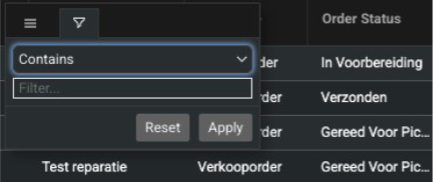
Previously, users had to know the exact beginning of a value (e.g., the full prefix of an Order ID) to get results from a column filter. Searches using partial fragments — such as the last few digits of a reference number — would return no results, causing users to fall back on Global Search, which is significantly slower and more resource-intensive. With this change, typing any fragment of a value (prefix, middle portion, or suffix) into a column filter will now return matching records. This applies consistently across all grids in the application, including Orders, Customers, Products, Purchase Orders, and more.
Users who prefer the previous behavior can still manually select "Starts with," "Ends with," "Equals," or other operators from the filter dropdown.
Multi-Currency Support in Journal Entries
ParagonERP now stores the original transaction currency amount alongside the base currency
amount in journal entries. Previously, when a foreign currency transaction (e.g., a USD invoice)
was recorded, only the converted base currency value (e.g., EUR) was saved in the ledger,
causing reconciliation difficulties. With this change, journal entries for customer invoices,
customer credit notes, vendor invoices, and vendor credit notes will include both the base
currency amount and the original transaction currency amount, along with the exchange rate
and currency code used at the time of the transaction. Base currency accounting integrity is
maintained. Note: This applies to new financial transactions only. Historical data and inventory transactions are not affected.