![paragon logo-1.png]](https://support.paragon-erp.com/hs-fs/hubfs/paragon%20logo-1.png?width=240&height=75&name=paragon%20logo-1.png)
This release gives you more control over how your inventory is valued and introduces a more efficient way to manage transaction lines. We are also preparing for a major update to how you view your data across all modules.
-
Inventory valuation control: Choose how the system resets stock value when quantities hit zero.
-
Universal scanning: You can now use a scanner to add products to any transaction line.
Improvements
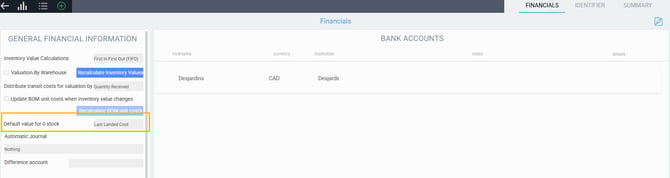
Zero stock valuation settings
When your stock level reaches zero units, Paragon resets the inventory value. We have added a new setting that lets you decide how this default value is calculated. You can now choose whether the system should use the landed costs or the initial purchase cost for this reset, ensuring your inventory evaluation stays consistent with your accounting practices.
Universal scanner support
To speed up your workflow, we have expanded scanner support across the system. You can now use a barcode scanner to add products to lines in any transaction module within Paragon, reducing manual entry and potential errors.
Coming up
System layouts for list views
We are currently building standard default layouts for all list views. Soon, every module will come with a pre-built view designed by our experts. You will be able to use these system defaults as a starting point to build and save your own personalized views.
